JavaSession
Session,服务端会话跟踪技术,将数据保存到服务端。
Session是存储在服务端,而Cookie是存储在客户端。存储在客户端的数据容易被窃取和截获,存在很多不安全的因素。存储在服务端的数据相比于客户端来说就更安全。
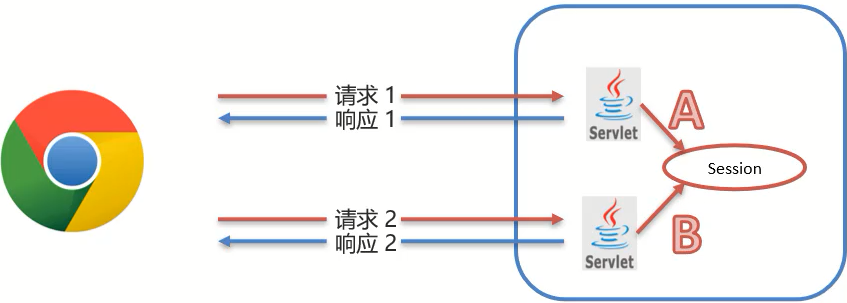
常用方法
HttpSession session = request.getSession():获取Session对象,使用的是Request对象。void setAttribute(String name, Object o):存储数据到 session 域中。Object getAttribute(String name):根据 key,获取值。void removeAttribute(String name):根据 key,删除该键值对。
原理分析
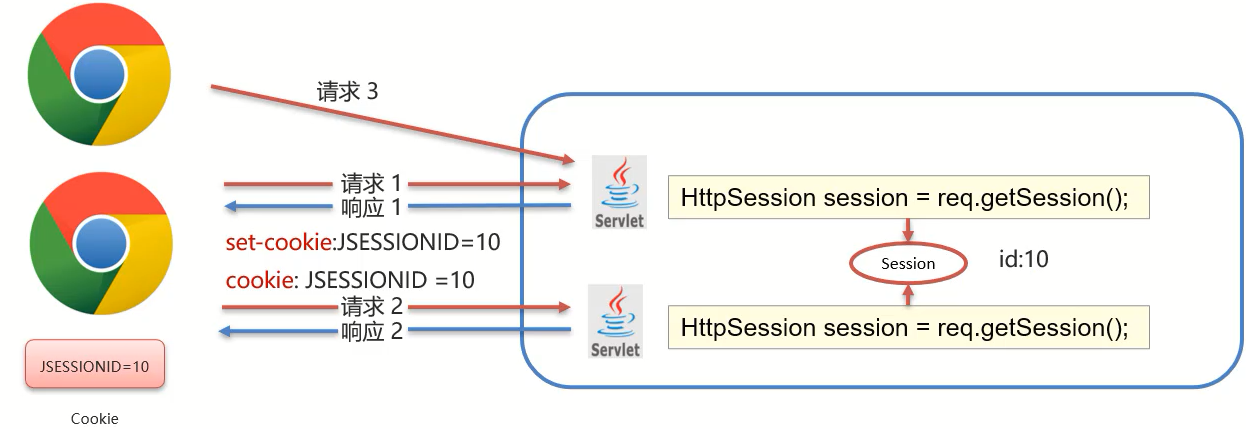
Session是基于Cookie实现的,Session要想实现一次会话多次请求之间的数据共享,就必须要保证多次请求获取Session的对象是同一个。
@WebServlet("/demo1")
public class SessionDemo1 extends HttpServlet {
    @Override
    protected void doGet(HttpServletRequest request, HttpServletResponse response)
            throws ServletException, IOException {
    	//存储到Session中
        //1. 获取Session对象
        HttpSession session = request.getSession();
        System.out.println(session);
        //2. 存储数据
        session.setAttribute("username","zs");
    }

    @Override
    protected void doPost(HttpServletRequest request, HttpServletResponse response)
            throws ServletException, IOException {
        this.doGet(request, response);
    }
}@WebServlet("/demo2")
public class SessionDemo2 extends HttpServlet {
@Override
protected void doGet(HttpServletRequest request, HttpServletResponse response)
throws ServletException, IOException {
//获取数据,从session中
//1. 获取Session对象
HttpSession session = request.getSession();
System.out.println(session);
//2. 获取数据
Object username = session.getAttribute("username");
System.out.println(username);
}
@Override
protected void doPost(HttpServletRequest request, HttpServletResponse response)
throws ServletException, IOException {
this.doGet(request, response);
}
}- demo1在第一次获取session对象的时候,session对象会有一个唯一的标识,假如是
id:10 - demo1在session中存入其他数据并处理完成所有业务后,需要通过Tomcat服务器响应结果给浏览器
- Tomcat服务器发现业务处理中使用了session对象,就会把session的唯一标识
id:10当做一个cookie,添加Set-Cookie:JESSIONID=10到响应头中,并响应给浏览器 - 浏览器接收到响应结果后,会把响应头中的coookie数据存储到浏览器的内存中
- 浏览器在同一会话中访问demo2的时候,会把cookie中的数据按照
cookie: JESSIONID=10的格式添加到请求头中并发送给服务器Tomcat - demo2获取到请求后,从请求头中就读取cookie中的JSESSIONID值为10,然后就会到服务器内存中寻找
id:10的session对象,如果找到了,就直接返回该对象,如果没有则新创建一个session对象 - 关闭打开浏览器后,因为浏览器的cookie已被销毁,所以就没有JESSIONID的数据,服务端获取到的session就是一个全新的session对象
钝化与活化
服务器端共用的session对象应该是存储在服务器的内存中,服务器重新启动后,内存中的数据应该是已经被释放,对象也应该都销毁了。
钝化
在服务器正常关闭后,Tomcat会自动将Session数据写入硬盘的文件中。
钝化的数据路径为:
项目目录\target\tomcat\work\Tomcat\localhost\项目名称\SESSIONS.ser
活化
再次启动服务器后,从文件中加载数据到Session中
数据加载到Session中后,路径中的
SESSIONS.ser文件会被删除掉
Session销毁
自动销毁
默认情况下服务器端无操作30分钟自动销毁,这个失效时间,可以通过配置进行修改。
在项目的web.xml中配置:
<?xml version="1.0" encoding="UTF-8"?>
<web-app xmlns="http://xmlns.jcp.org/xml/ns/javaee"
         xmlns:xsi="http://www.w3.org/2001/XMLSchema-instance"
         xsi:schemaLocation="http://xmlns.jcp.org/xml/ns/javaee http://xmlns.jcp.org/xml/ns/javaee/web-app_3_1.xsd"
         version="3.1">

    <session-config>
        <session-timeout>100</session-timeout>
    </session-config>
</web-app>或者直接到Tomcat的conf目录中的web.xml修改(全局设置)。
手动销毁
调用Session对象的invalidate()进行销毁。
@WebServlet("/demo2")
public class SessionDemo2 extends HttpServlet {
    @Override
    protected void doGet(HttpServletRequest request, HttpServletResponse response)
            throws ServletException, IOException {
        //获取数据,从session中
        //1. 获取Session对象
        HttpSession session = request.getSession();
        System.out.println(session);

        // 销毁
        session.invalidate();
        //2. 获取数据
        Object username = session.getAttribute("username");
        System.out.println(username);
    }

    @Override
    protected void doPost(HttpServletRequest request, HttpServletResponse response)
            throws ServletException, IOException {
        this.doGet(request, response);
    }
}
Cookie和Session的区别
| Cookie | Session | |
|---|---|---|
| 存储位置 | 客户端 | 服务端 |
| 安全性 | 不安全 | 安全 |
| 数据大小 | 最大3KB | 无大小限制 |
| 存储时间 | 可以长期存储 | 默认30分钟 |
| 服务器性能 | 不占服务器资源 | 占用服务器资源 |
Last updated on